For solo real estate agents

Run your real estate business from one spreadsheet

Your leads are in your phone, your deals are in your inbox, and your commissions and mileage are in a shoebox. This one workbook puts it all in one place. You fill in the data and the formulas do the rest.

or grab the free calculator (Excel + Google Sheets, $0)

  • Excel + Google Sheets
  • No subscription
  • Instant download

Free download

Not ready to buy? Start with the free calculator

Free 2027 Real Estate Goal + Commission Calculator

Type in your 2027 income goal and see exactly how many closings, appointments and leads you need each week. Then see your real take-home on every deal after split, referral fees and taxes.

  • Excel + Google Sheets
  • $0, just enter your email
  • Instant download
Get the free calculator

Or use the free online versions, no download needed:

What's inside

10 tabs that work together

A CRM, a deal pipeline that flags contract deadlines, a commission and income tracker, a tax-ready expense and mileage log, and a goal planner that turns your income target into a weekly number.

Tap any preview to see it full size.

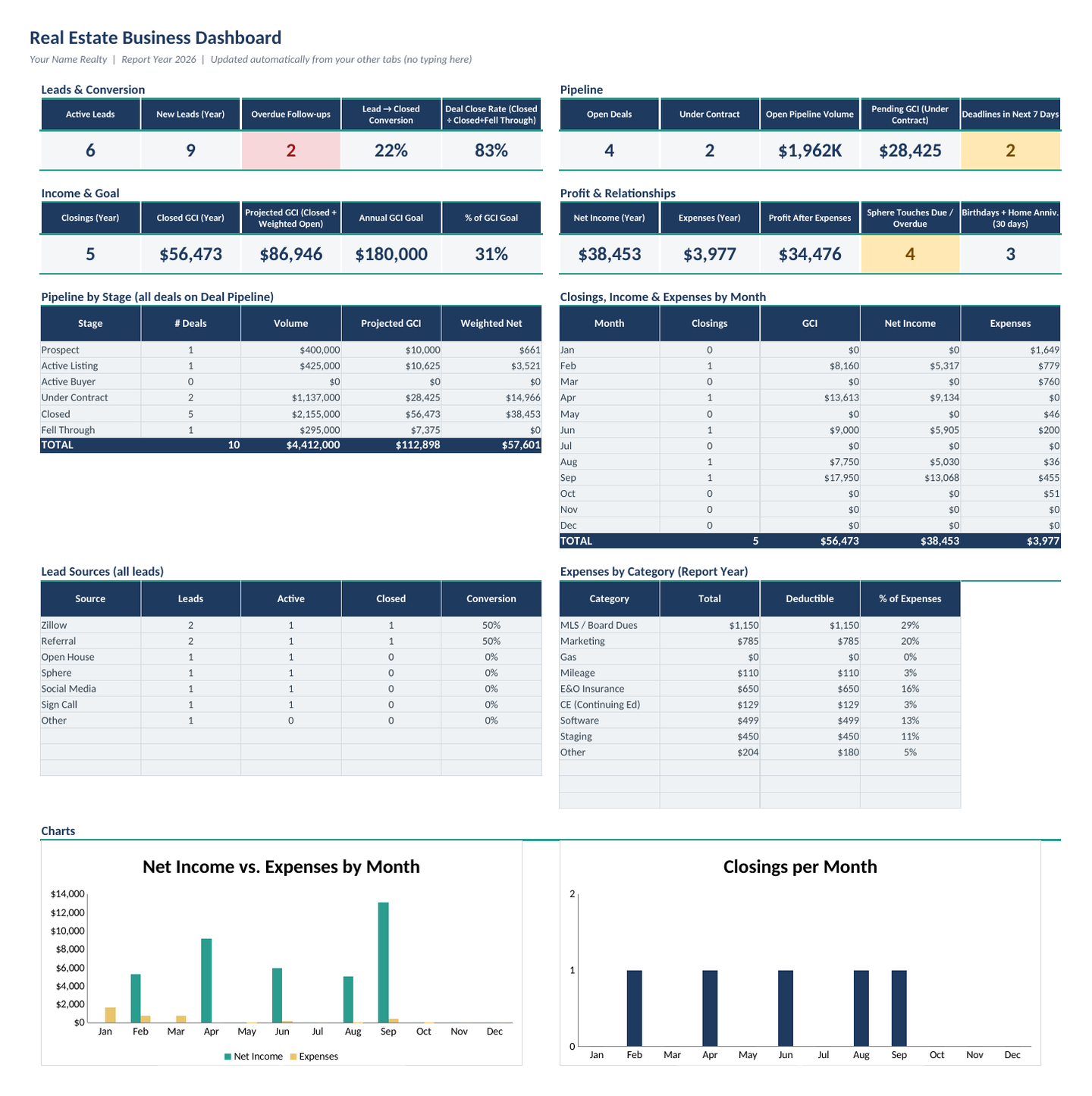
Dashboard tab with summary tiles, pipeline by stage, monthly income and expenses, lead sources, and charts.
01

Dashboard

Updates itself: active leads, overdue follow-ups, open deals, pipeline by stage, closed and projected GCI, % of goal, and net income vs. expenses, plus monthly charts.

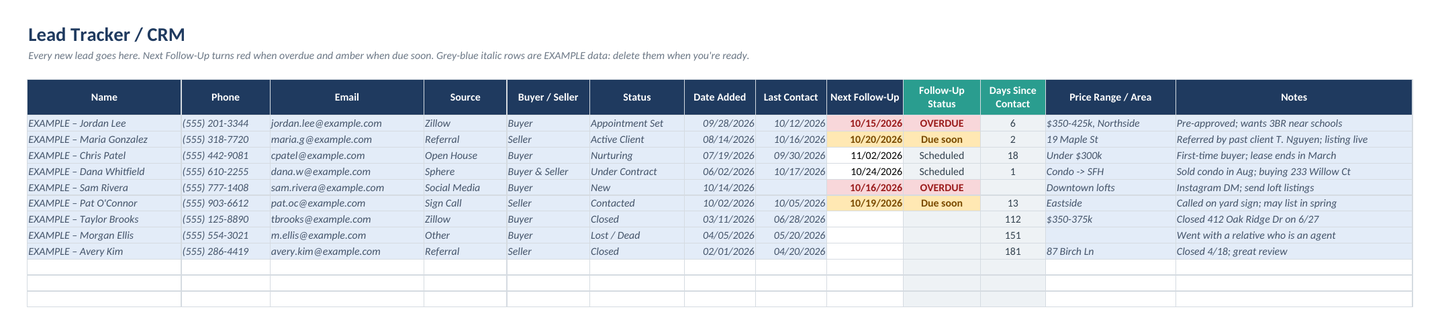
Lead Tracker tab listing leads with source, buyer or seller, status, and follow-up dates highlighted red when overdue.
02

Lead Tracker / CRM

Dropdowns for source, buyer/seller, and status. Overdue follow-ups turn red; ones due soon turn amber.

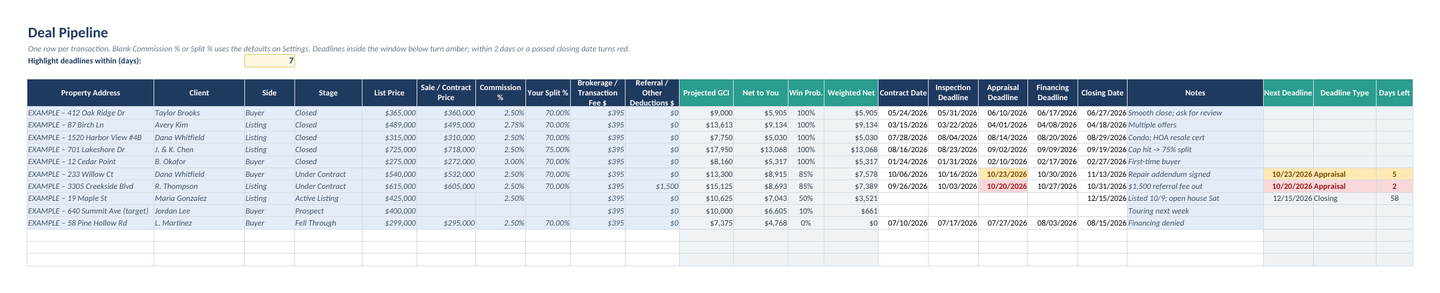
Deal Pipeline tab showing each deal's stage, price, projected GCI, net after split and fees, and key contract dates.
03

Deal Pipeline

Projected GCI and your net after split, brokerage, and referral fees. Contract, inspection, appraisal, financing, and closing dates light up as they get close.

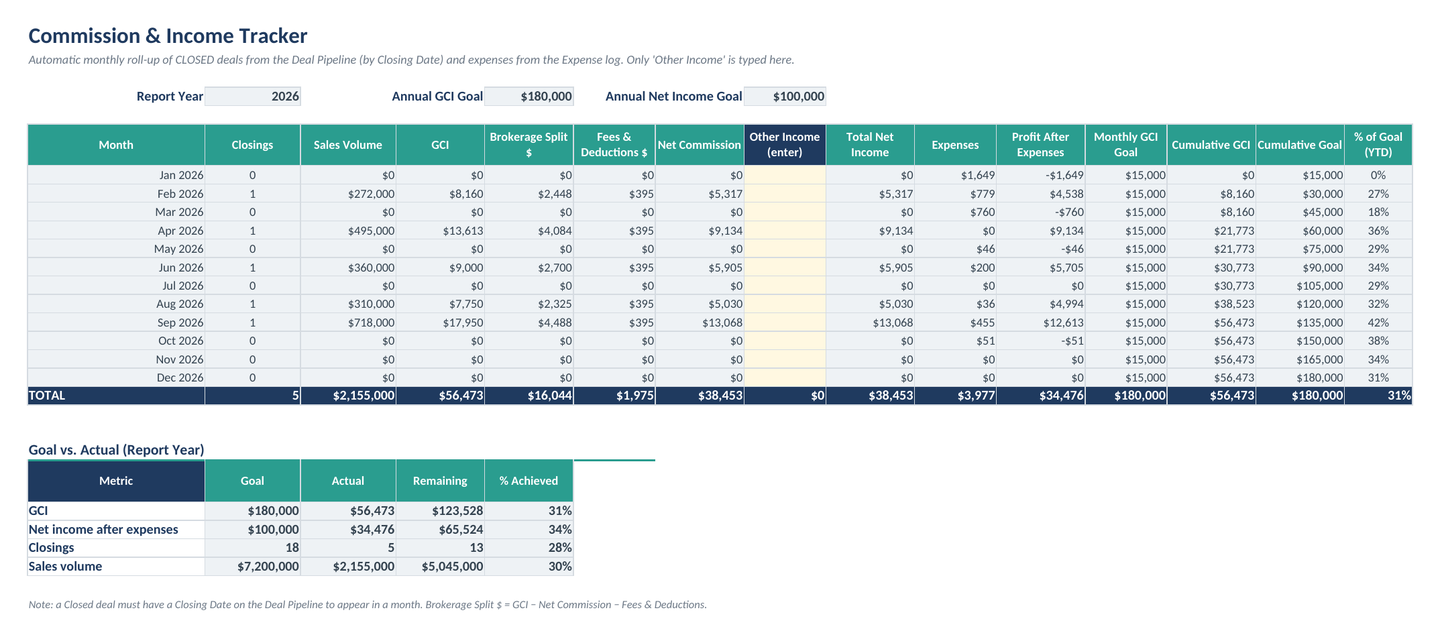
Commission and Income tab with a month-by-month table of GCI, brokerage split, fees, net income, expenses, and profit.
04

Commission & Income

Closed deals rolled up month by month: GCI, split, fees, net, other income, expenses, and profit, with goal pacing and a goal-vs-actual summary.

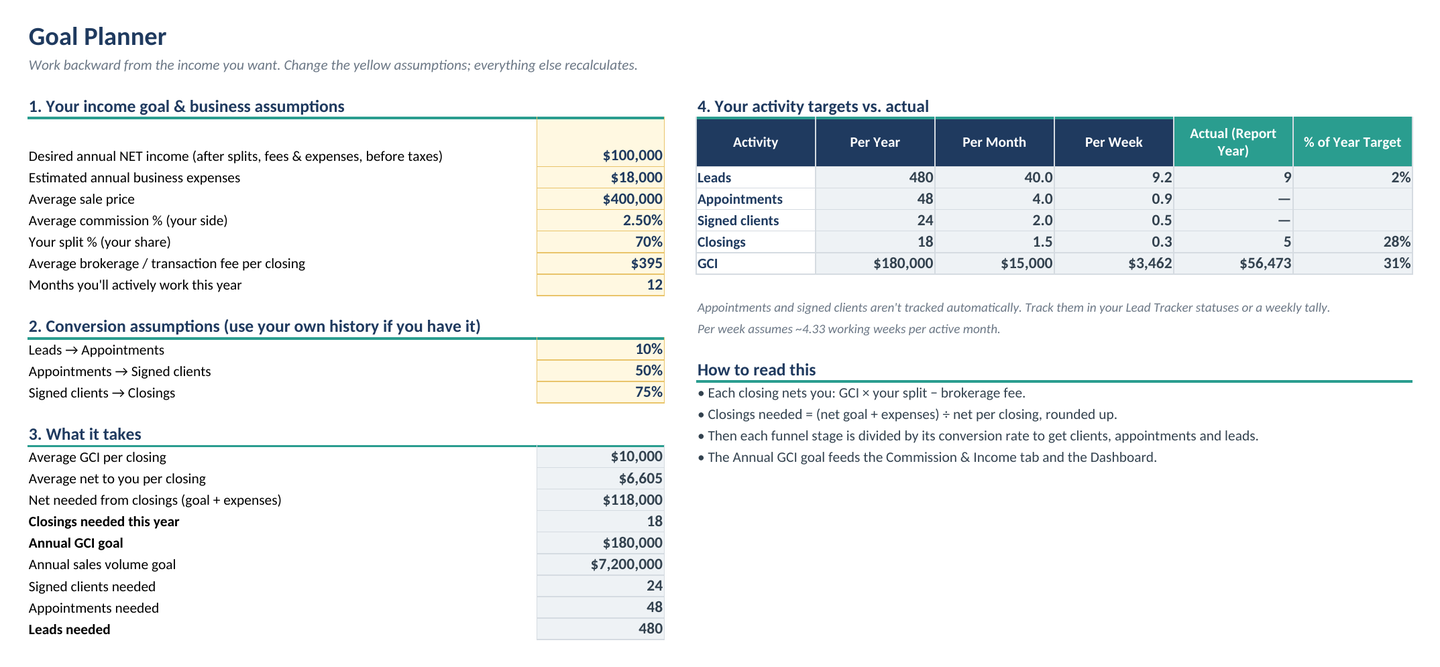
Goal Planner tab turning a net income goal into the closings, signed clients, appointments, and leads needed per year, month, and week.
05

Goal Planner

Enter the net income you want and see the closings, signed clients, appointments, and leads you need per year, month, and week, with your actuals alongside.

Every tab in the workbook

  1. Start Here
  2. Dashboard
  3. Lead Tracker
  4. Deal Pipeline
  5. Transaction Checklist
  6. Commission & Income
  7. Expenses & Mileage
  8. Goal Planner
  9. Sphere & Past Clients
  10. Settings
  • Room for 300 leads, 150 deals, 400 expenses, and 300 sphere contacts
  • Mileage at the IRS rate for each trip date (2026 rates preloaded, editable)
  • Example data included so you can see how it works

Who it's for

Built for agents who run their own show

  • Solo agents

    Leads, deals, commissions, expenses, and follow-ups in one file instead of scattered across your phone, inbox, and notes.

  • New agents

    A Start Here tab walks you through a 10-minute setup, and the example rows show you what goes where.

  • Agents tired of monthly fees

    A CRM and pipeline with no subscription. Pay once, keep the file, and reuse it every year.

  • Goal-driven producers

    Turn your income goal into a weekly number of closings, appointments, and leads, and see how you're pacing.

  • Tax-season planners

    A deductible flag, category totals, and mileage calculated at the IRS rate for each trip date. (It's a tool, not tax advice.)

  • "Not a spreadsheet person"

    Type only in the white and yellow cells. Everything in grey calculates itself. Nothing is locked if you want to customize.

Pricing

Pick your system

One-time purchase. Secure checkout and instant download through Payhip.

The Solo Agent Business System

The all-in-one real estate business spreadsheet

$44 one-time

Launch offer: use code LAUNCH39 at checkout to pay $39

  • 10-tab .xlsx workbook for Excel and Google Sheets
  • Self-updating dashboard and monthly charts
  • Lead tracker / CRM with follow-up alerts
  • Deal pipeline with deadline highlights and weighted forecast
  • Transaction checklists for listing and buyer sides
  • Commission & income tracker with goal pacing
  • Expense & mileage log with 2026 IRS rates preloaded
  • Goal planner and sphere & past-client follow-ups
Get the System: $44

How it works

Ready, set, go

  1. Buy

    Check out securely on Payhip. It's a one-time payment with no subscription.

  2. Download

    Your files are ready to download right after purchase.

  3. Open in Excel or Google Sheets

    Open the workbook in Excel, or upload it to Google Drive and save it as a Google Sheet. Then follow the 10-minute Start Here setup.

FAQ

Questions, answered

Does it work in Excel or Google Sheets?

Both. It works in Microsoft Excel (Windows or Mac, Excel 2010 or newer, and Microsoft 365) and in Google Sheets. You don't need Excel: a free Google account is enough. Upload the file to Google Drive, then choose File > Save as Google Sheets, and your formulas, dropdowns, and highlighting come with it. It uses only standard formulas, dropdowns, and conditional formatting, with no macros, add-ins, or Power Query. Apple Numbers and LibreOffice will open the file, but they aren't officially supported.

Is this a subscription?

No. It's a one-time purchase. You pay once and keep the file. To use it again next year, save a copy, change the Report Year on the Settings tab, and update the mileage rate.

How do I get my files?

Downloads are instant. After checkout on Payhip, you can download your files right away.

What's your refund policy?

These are instant digital downloads, so all sales are final. If a file won't open or doesn't work as described, email [email protected] within 14 days and we'll fix it or give you a full refund.

I'm not a spreadsheet person. Is it hard to use?

You only type in the white and yellow cells. Everything in grey calculates by itself. The Start Here tab walks you through setup in about 10 minutes, and the example rows show you what goes where. Delete the example data when you're ready.

Can I change it to fit my brokerage and market?

Yes. You can rename or add lead sources, statuses, deal stages, expense categories, and checklist tasks. Set your own split, commission, fees, and stage probabilities. Nothing is locked.

What's in the holiday social kit?

The Agent 2027 Bundle includes 12 square posts covering Thanksgiving through January, with editable spots for your name, brokerage, and phone number. They open in Google Slides, PowerPoint, or Canva.

Is this tax or legal advice?

No. It's an organizational tool. The mileage rates come from IRS publications for 2026, but check deductions and recordkeeping requirements with your tax professional, and adjust the checklists to your state's forms and your brokerage's compliance rules.

Start 2027 with a plan

Get the system plus 12 holiday posts for $49, or the system alone for $44.