For working photographers

Run your photography business from one spreadsheet

Inquiries in your DMs, bookings in your calendar, payments in three apps, and gallery deadlines in your head. This Excel workbook puts them in one place: every inquiry, booking, balance, and gallery deadline, plus your income, pricing, and goals.

  • Works in Microsoft Excel
  • Pay once, no subscription
  • Instant download

What's inside

9 tabs that work together

An inquiry CRM that flags overdue follow-ups, bookings with retainer and balance tracking, a workflow tracker with gallery delivery deadlines, income and expenses with a tax set-aside, a package pricing calculator, and a goal planner, all feeding one dashboard.

Tap any preview to see it full size. Names in the previews are example data.

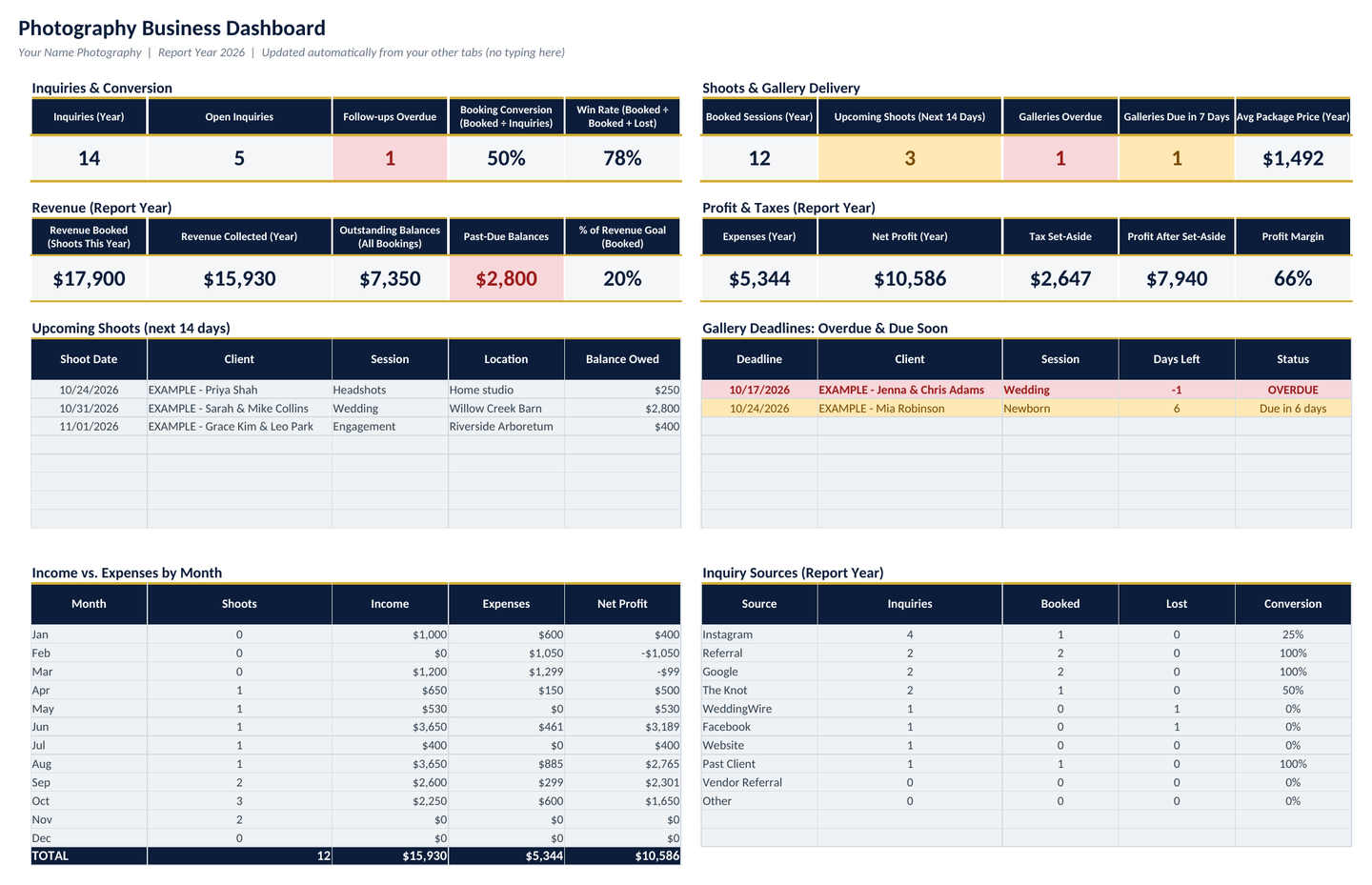
Dashboard: summary tiles for inquiries, conversion, booked sessions, upcoming shoots, overdue galleries, revenue booked and collected, past-due balances, and profit, with monthly income and inquiry-source tables.
01

Dashboard

Updates itself from your other tabs: inquiries and booking conversion, win rate, booked sessions, revenue booked vs. collected, outstanding and past-due balances, shoots in the next 14 days, galleries overdue or due soon, income vs. expenses by month, session-type and lead-source breakdowns, and 2 charts.

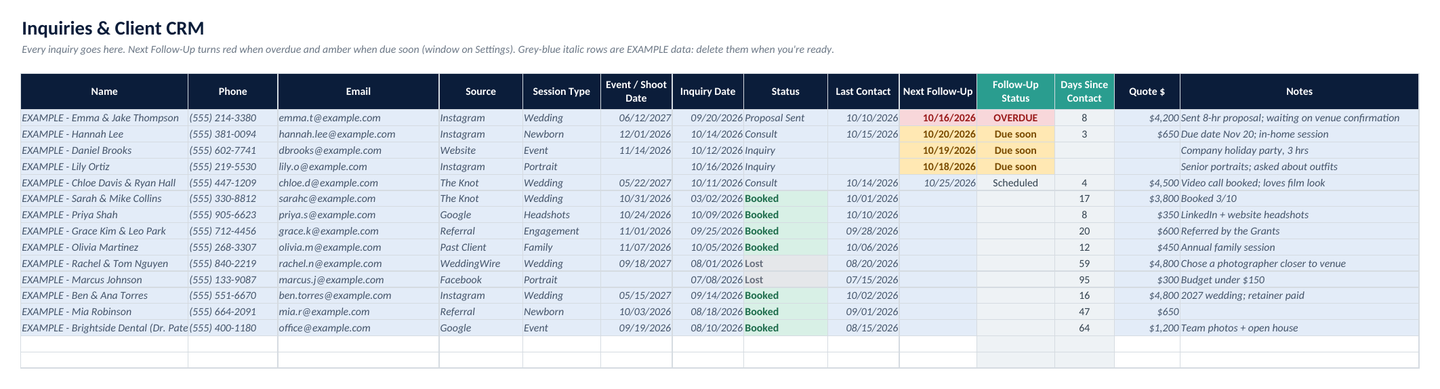
Inquiries CRM: each inquiry with source, session type, shoot date, status, next follow-up, and follow-up status flagged when overdue.
02

Inquiries & client CRM

Dropdowns for source (Instagram, referral, Google, The Knot, WeddingWire and more), session type, and status from Inquiry to Booked or Lost. Overdue follow-ups turn red; ones due within 3 days turn amber.

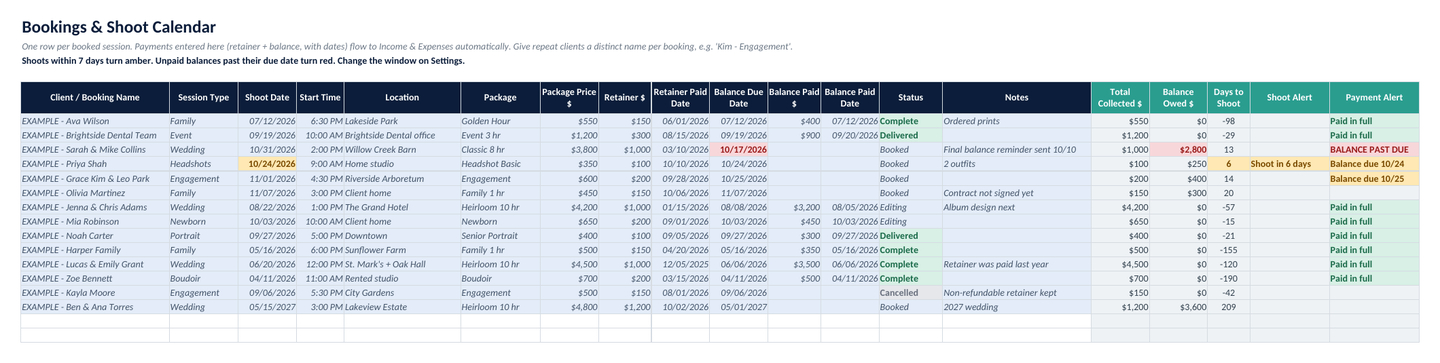
Bookings: shoot date and time, location, package, price, retainer, balance due date, paid amounts, and status.
03

Bookings & shoot calendar

Shoot date and time, location, package, price, retainer, and balance with due and paid dates. Shoots in the next 7 days turn amber and unpaid balances past their due date turn red.

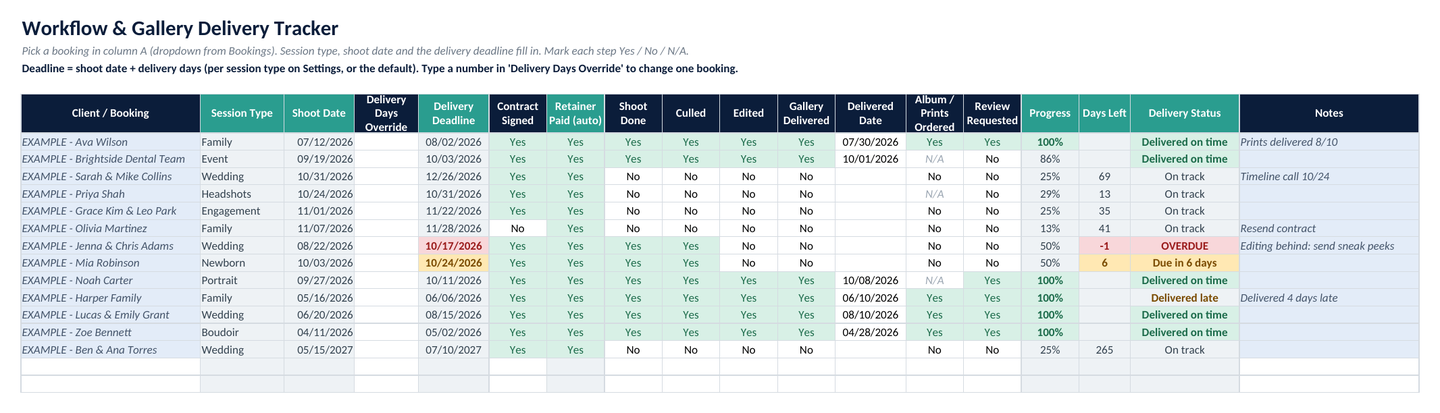
Workflow tracker: contract, retainer, shoot, cull, edit, gallery delivered, album and review steps with a progress percentage and delivery deadline.
04

Workflow & gallery delivery

Contract signed, retainer paid (filled in automatically), shoot done, culled, edited, gallery delivered, album ordered, and review requested, with a progress %. The delivery deadline is the shoot date plus the delivery days for that session type, with overdue alerts and on-time or late tracking.

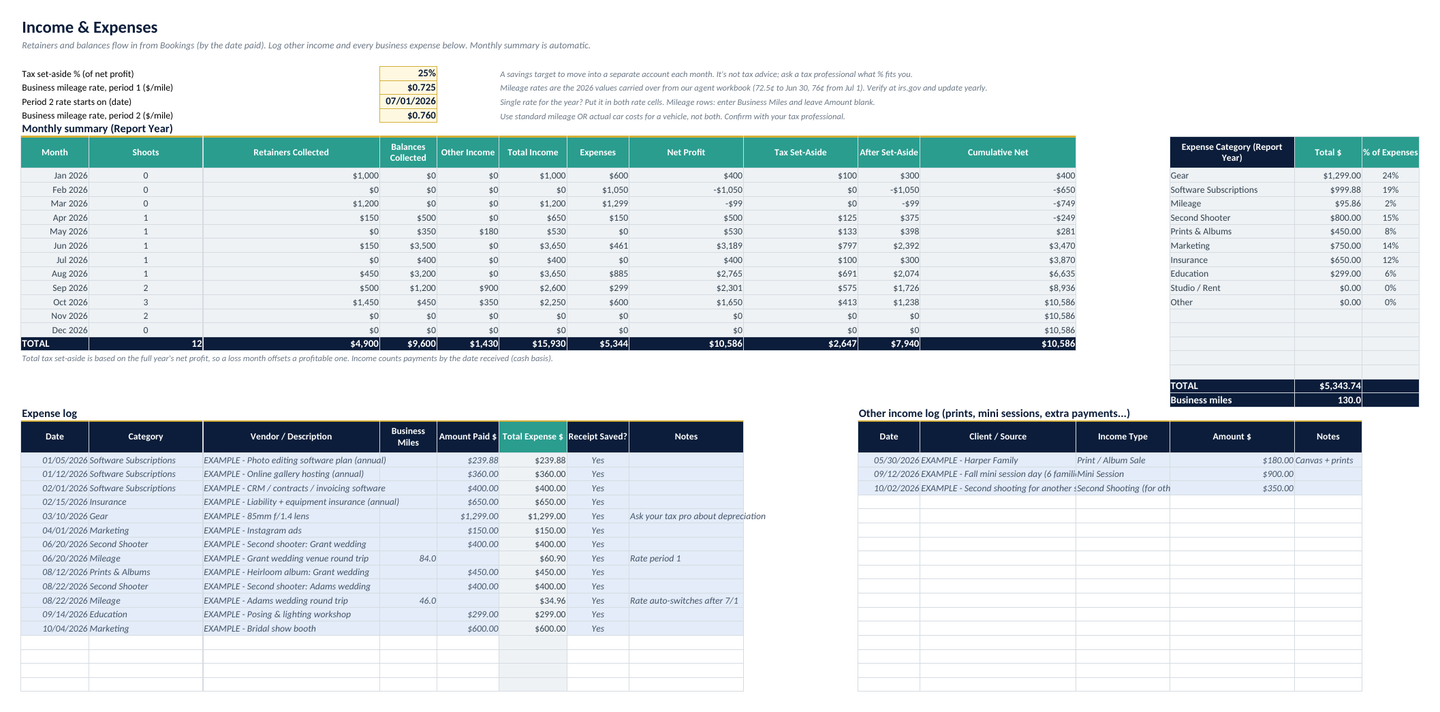
Income and expenses: monthly summary of shoots, retainers and balances collected, other income, expenses, net profit, and tax set-aside, plus expense category totals.
05

Income & expenses

Retainers and balances flow in from Bookings by the date paid. Log other income and expenses (gear, software, mileage, second shooter, prints and albums, marketing, insurance, education) and get category totals, a monthly summary, and a tax set-aside at the % you choose.

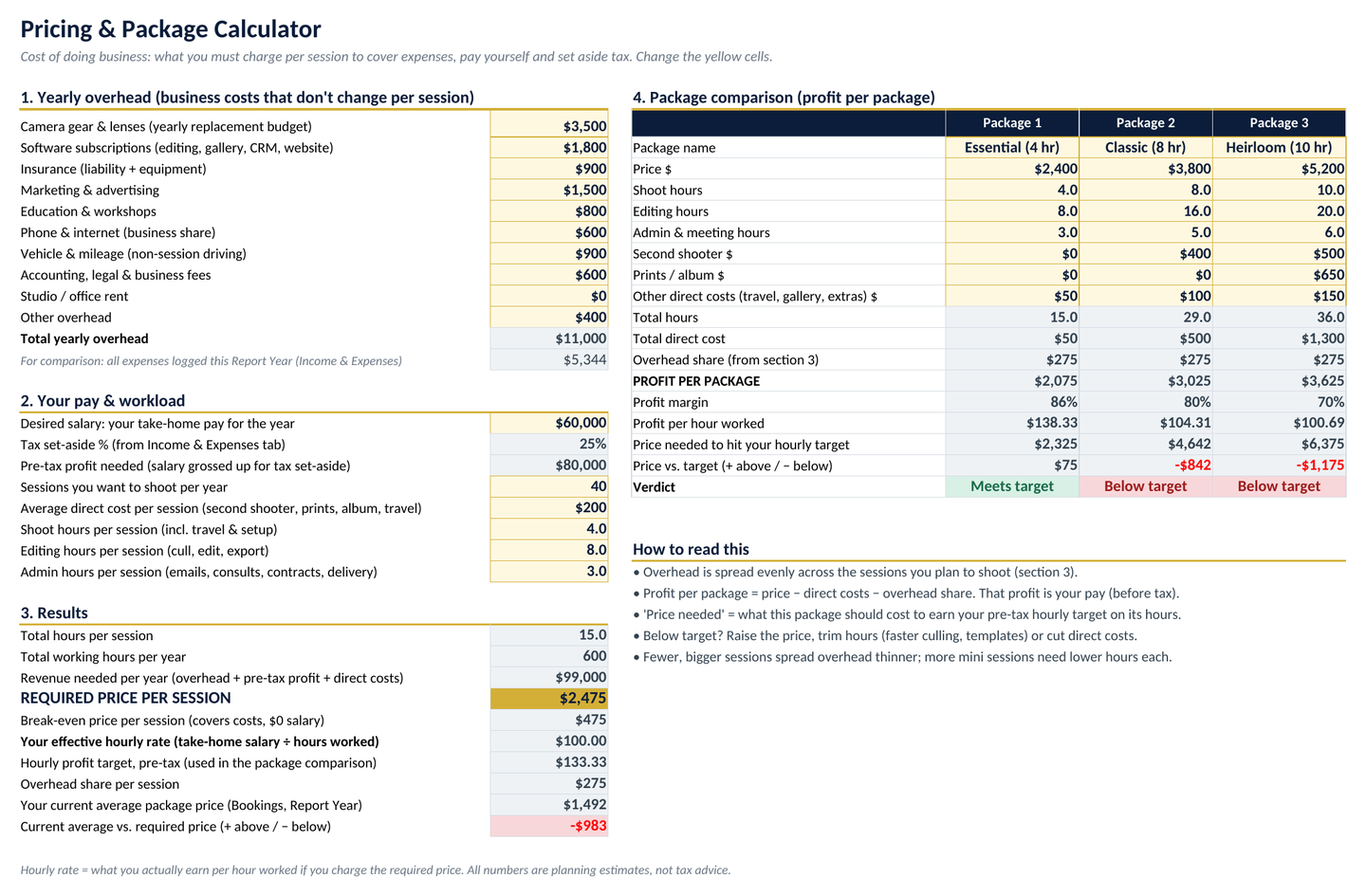
Pricing calculator: yearly overhead, desired salary and workload produce a required price per session, a break-even price, and an hourly rate, plus a three-package profit comparison.
06

Pricing & package calculator

Enter your yearly overhead, the salary you want, sessions per year, and hours per session to get a required price per session, a break-even price, and your effective hourly rate. Compare 3 packages side by side with profit per package and a verdict against your target. Want to try the math first? Use the free photography pricing calculator.

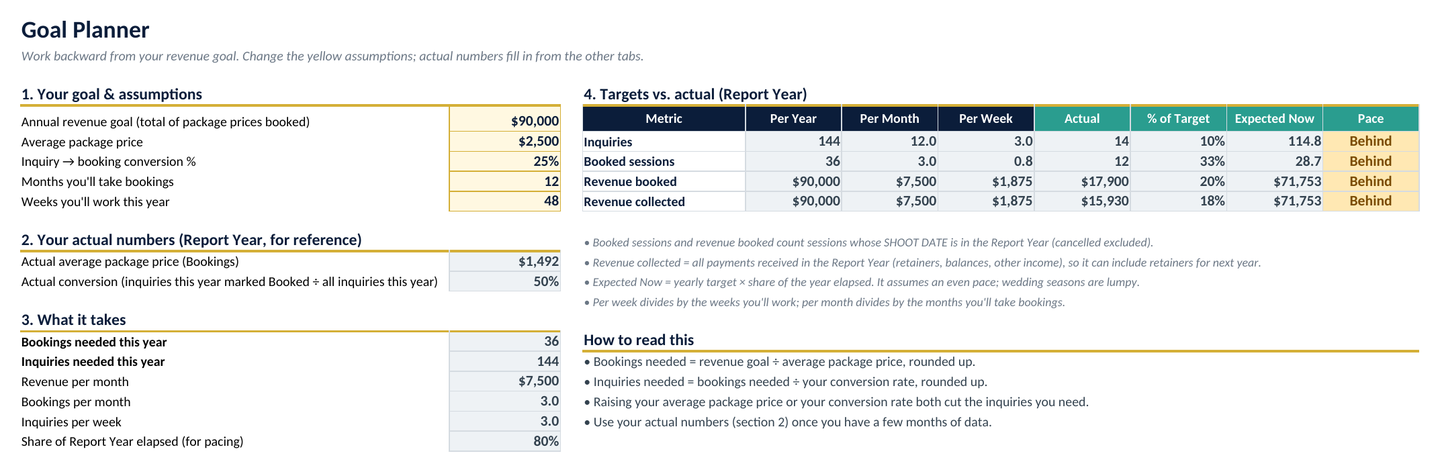
Goal planner: revenue goal, average package price and conversion rate turned into bookings and inquiries needed per year, month, and week, with actuals and pace.
07

Goal planner

Revenue goal ÷ average package price ÷ conversion rate gives the bookings and inquiries you need per year, month, and week, next to your actual numbers and whether you're on pace.

Every tab in the workbook

  1. Start Here
  2. Dashboard
  3. Inquiries CRM
  4. Bookings
  5. Workflow
  6. Income & Expenses
  7. Pricing Calculator
  8. Goal Planner
  9. Settings
  • Room for 300 inquiries, 200 bookings, and 400 expenses
  • About 5,000 formulas, with no macros or add-ins
  • Session types, sources, categories, and delivery days are all editable in Settings
  • Example rows included so you can see how it works

Who it's for

Built for photographers who run the business side themselves

  • Wedding & event photographers

    Long lead times, retainers and balances, and big galleries. See every inquiry, every balance due, and every delivery deadline before it slips.

  • Portrait, family & newborn

    Lots of sessions with different turnaround times. Set delivery days per session type and track every gallery from shoot to review request.

  • Pricing for profit

    Not sure your packages cover your costs? The pricing calculator shows the price you need, your break-even, and what you actually earn per hour.

An honest note: this is a spreadsheet you update yourself. It doesn't send contracts, invoices, or emails for you. If you need automated client workflows, a dedicated studio management app is a better fit.

Pricing

One price, yours to keep

FAQ

Questions, answered

What do I need to use it?

Microsoft Excel. It's a single .xlsx workbook with no macros and no add-ins, so there's nothing to install or enable. Open it, type in the white and yellow cells, and the formulas do the rest.

Does it work in Google Sheets or Apple Numbers?

It's made for Microsoft Excel. We haven't confirmed that every formula and alert works in Google Sheets or Apple Numbers, so we don't recommend buying it for either one.

Is this a subscription?

No. It's a one-time purchase of $34. You download the file and it's yours to keep and edit.

Can I change it to fit my business?

Yes. The Settings tab holds your session types, inquiry sources, booking statuses, expense categories, alert windows, and gallery delivery days per session type. Change them there and the dropdowns, deadlines, and reports follow. Example rows are labeled EXAMPLE so you can see how everything works, then delete them.

How much can it hold?

Room for 300 inquiries, 200 bookings, and 400 expenses, which covers a busy year for most solo photographers.

Is this tax or accounting advice?

No. It's an organizing and planning tool. The tax set-aside is a savings percentage you choose, and the mileage rates are editable cells (the 2026 IRS rates are preloaded). Check deductions and tax questions with a tax professional.

What's your refund policy?

These are instant digital downloads, so all sales are final. If a file won't open or doesn't work as described, email [email protected] within 14 days and we'll fix it or give you a full refund.

Get your photography business into one file

Inquiries, bookings, balances, gallery deadlines, income, pricing, and goals. $34, pay once.