For therapists in private practice

The business side of your practice in one spreadsheet

Running a solo practice means tracking more than sessions: who still owes a late-cancel fee, which insurance claims are 30 days old, whether this month covered rent, and how many clients you actually need. This Microsoft Excel workbook puts the business side of your practice in one file.

  • Built for Microsoft Excel
  • Client ID codes only
  • Pay once, no subscription

Privacy note

Business tracking only. Use client ID codes, never names. Do not store clinical notes. Session and billing records may still be protected health information, so keep this file on a secure, encrypted device or a HIPAA-appropriate account you control, and check with your own compliance advisor. This is not an EHR and is not HIPAA compliant software.

What's inside

9 tabs that work together

Track clients by ID code, log each session's attendance and payment, and let your cancellation policy calculate late-cancel and no-show fees automatically. Follow up on insurance claims with days outstanding, plus overdue, denied and underpaid flags. Client and insurance payments flow into a monthly income-and-expense summary with a tax set-aside.

Tap any preview to see it full size. Client codes in the previews are example data.

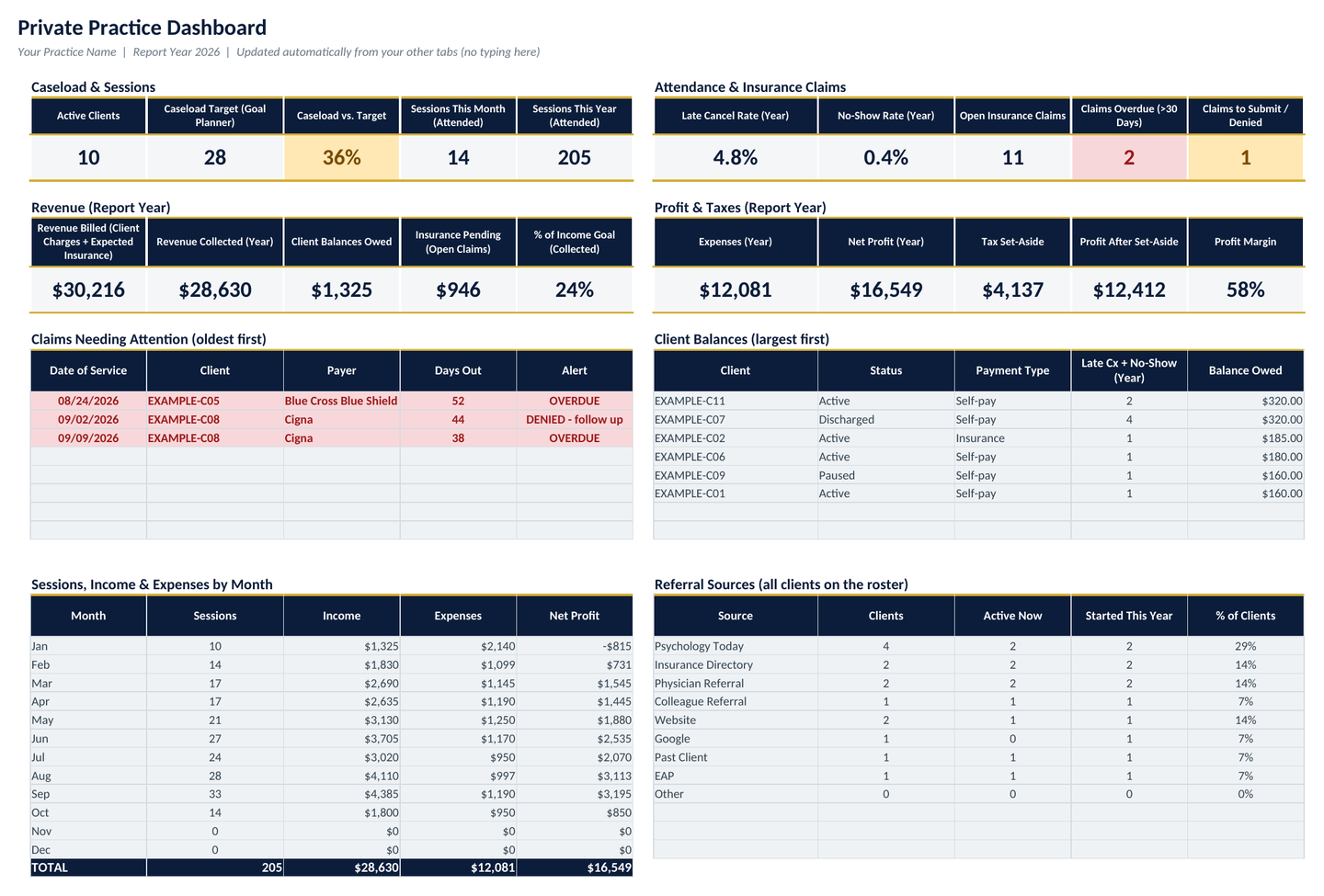
Dashboard: active clients vs. caseload target, sessions, late-cancel and no-show rates, revenue billed vs. collected, balances, insurance pending, claims needing attention, monthly income vs. expenses and referral sources.
01

Dashboard

Active clients vs. caseload target, sessions this month and year, late-cancel and no-show rates, revenue billed vs. collected, client balances owed, insurance pending, overdue and denied claims, monthly income vs. expenses, referral sources, payer summary and 2 charts.

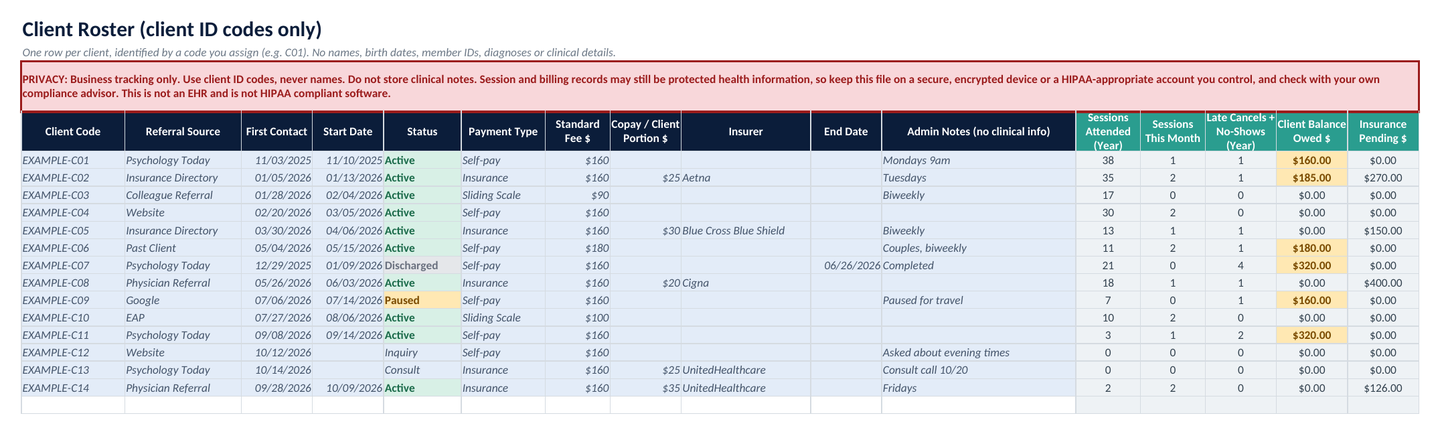
Client Roster: one row per client code with referral source, dates, status, payment type, fee, copay and insurer. No names or clinical fields.
02

Client Roster (ID codes only)

Referral source, first contact and start date, status (Inquiry, Consult, Active, Paused, Discharged), payment type (self-pay, insurance, sliding scale), standard fee, copay and insurer name. There are no fields for names, birth dates, member IDs or clinical details.

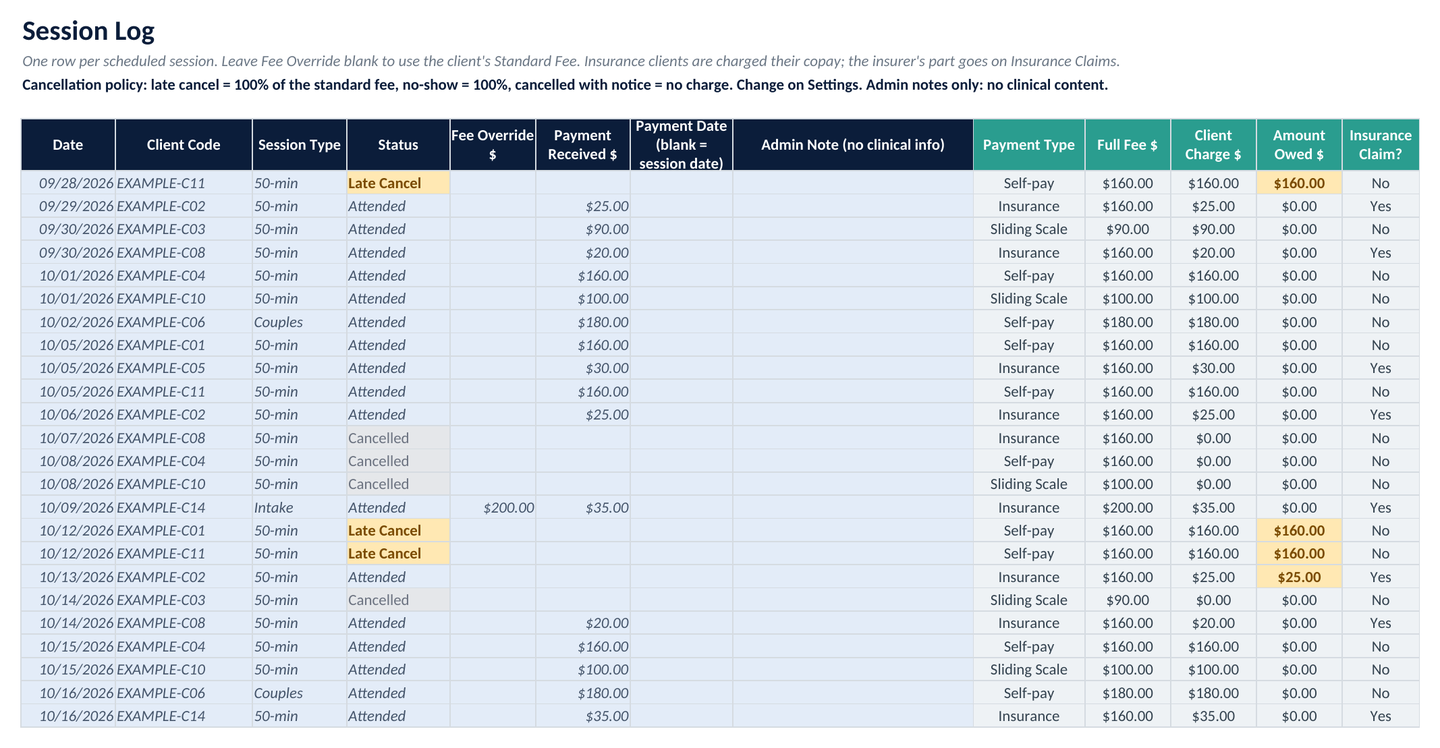
Session Log: date, client code, session type, attendance status, fee, payment received and amount owed.
03

Session Log

Date, client code, session type (intake, 50-min, 30-min, couples, group), status (attended, late cancel, no-show, cancelled), fee, payment received and amount owed. Late-cancel and no-show fees follow the % you set.

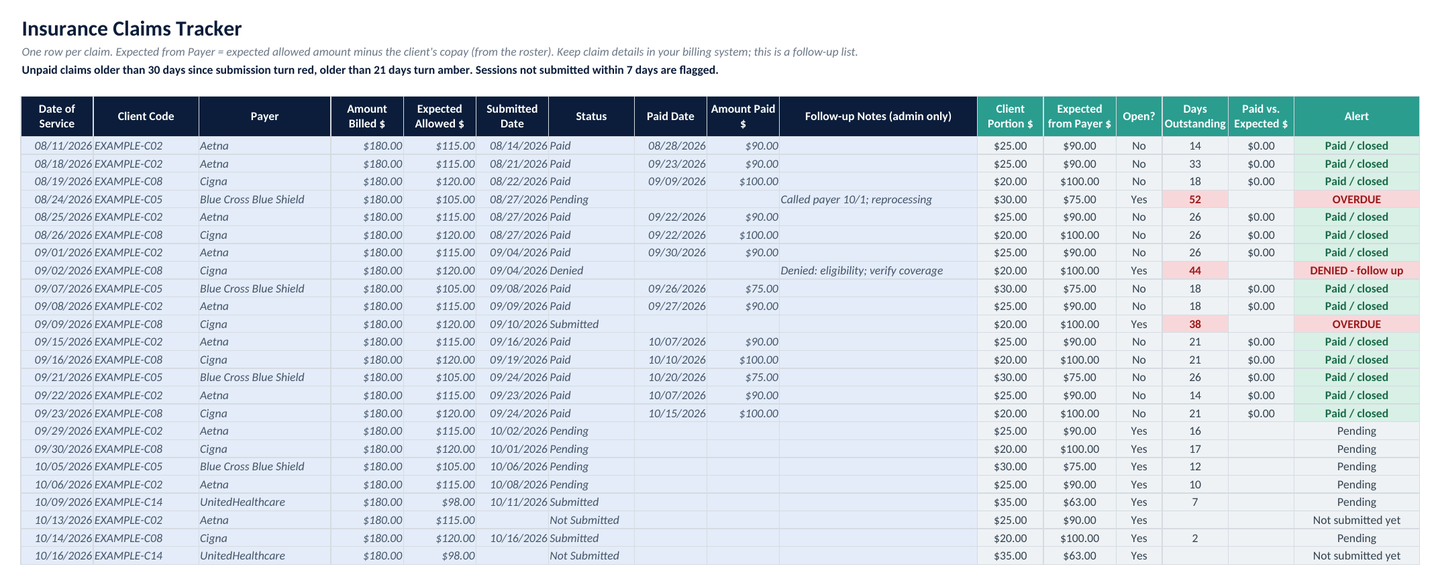
Insurance Claims Tracker: date of service, payer, billed and expected allowed amounts, submitted and paid dates, status and days outstanding with alerts.
04

Insurance Claims Tracker

Date of service, payer, amount billed, expected allowed amount, submitted and paid dates, amount paid, status and days outstanding. Flags claims past your overdue window (default 30 days), denied and underpaid claims, and sessions not yet submitted.

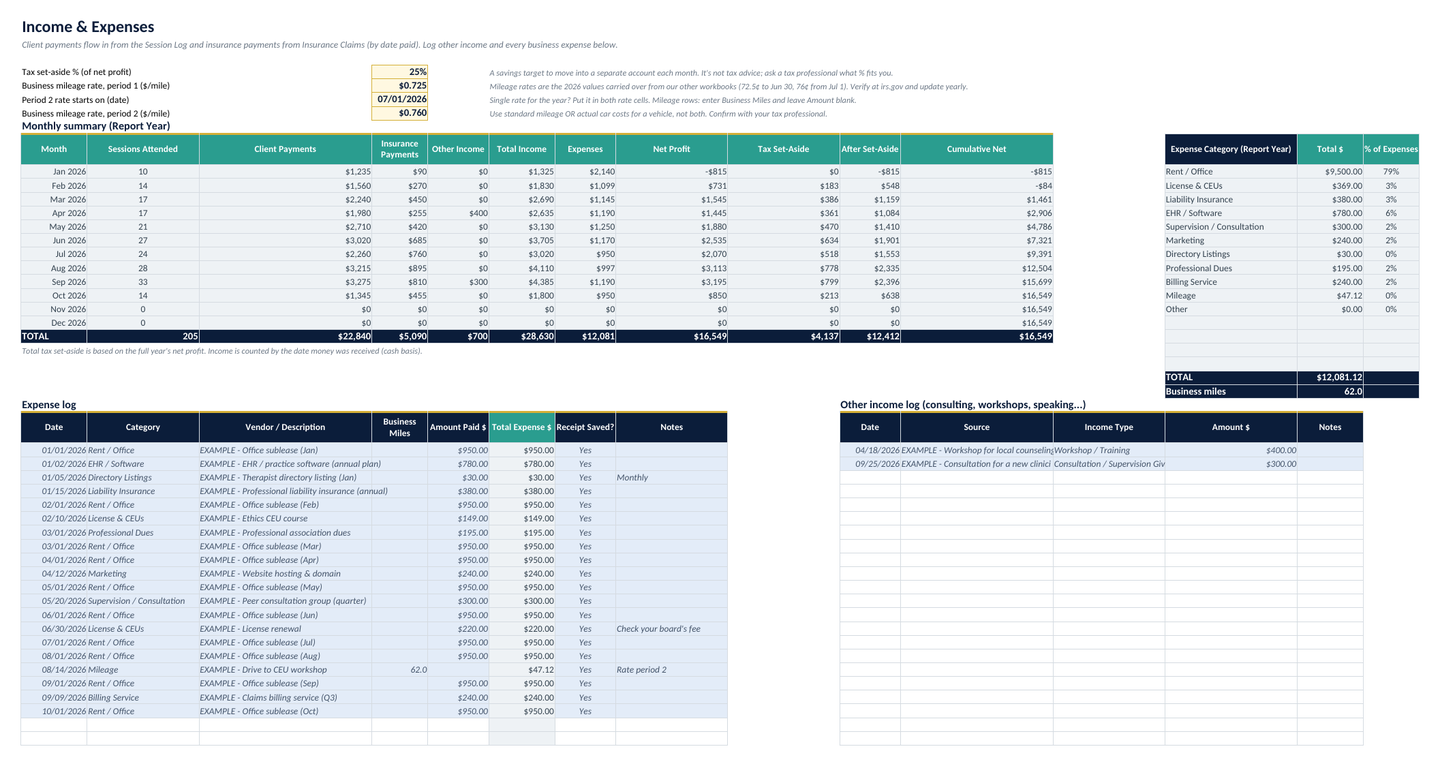
Income and expenses: client and insurance payments by month, other income, expenses by category and a tax set-aside.
05

Income & Expenses

Client and insurance payments pulled in automatically by date received, an other-income log, an expense log (rent, license and CEUs, liability insurance, EHR/software, supervision, marketing, directory listings and more, with mileage), category totals and a tax set-aside % you choose.

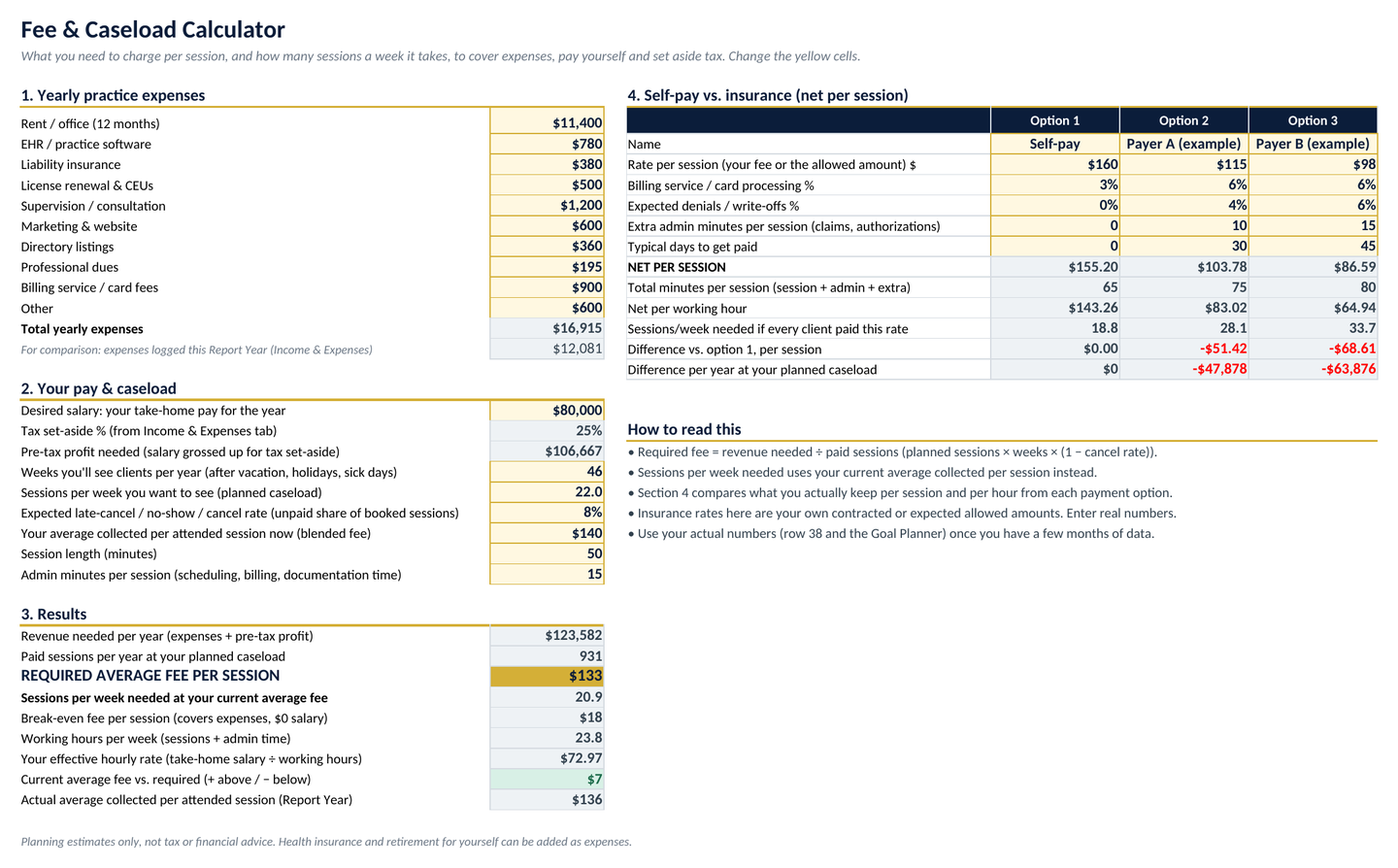
Fee and Caseload Calculator: yearly expenses, pay and caseload produce a required average fee per session, sessions per week, break-even fee and hourly rate, plus a self-pay vs. insurance comparison.
06

Fee & Caseload Calculator

Required average fee per session, sessions per week needed, break-even fee and effective hourly rate, plus self-pay vs. insurance net per session and per hour.

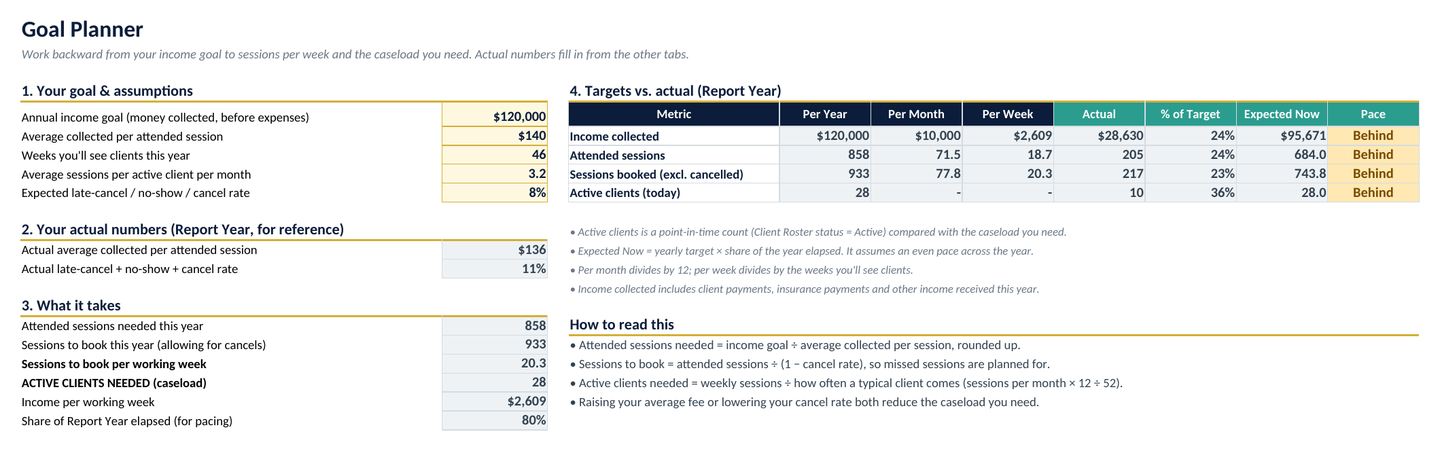
Goal Planner: income goal turned into sessions per week and active clients needed, with actual numbers and pace.
07

Goal Planner

Income goal to sessions per week and active clients needed, with your actual numbers and pace.

Every tab in the workbook

  1. Start Here
  2. Dashboard
  3. Client Roster
  4. Session Log
  5. Insurance Claims
  6. Income & Expenses
  7. Fee & Caseload Calculator
  8. Goal Planner
  9. Settings
  • Room for 200 clients, 1,200 sessions and 600 claims
  • Built for Microsoft Excel. No macros, no add-ins
  • Settings: report year, claim alert windows, cancellation fee rule and every dropdown list
  • Example rows (client codes like EXAMPLE-C01) show how it works. Delete them in a minute

Good to know

What it is, and what it isn't

  • It's for business tracking only, not a clinical record.
  • It's a business organizer, not an EHR, billing clearinghouse or claims-submission tool. It doesn't submit claims.
  • It isn't legal, tax, billing or compliance advice.
  • Built and tested for Microsoft Excel. We haven't confirmed Google Sheets or Apple Numbers.

Pricing

One price, yours to keep

FAQ

Questions, answered

What do I need to use it?

Microsoft Excel. It's built for Excel, with no macros and no add-ins.

Does it work in Google Sheets or Apple Numbers?

It's built and tested for Microsoft Excel. We haven't confirmed Google Sheets or Apple Numbers, so we don't claim them.

Can I enter client names or session notes?

No. Track clients by ID code only. The Client Roster has no fields for names, birth dates, member IDs or clinical details, and you shouldn't store clinical notes in the file. Business tracking only. Use client ID codes, never names. Do not store clinical notes. Session and billing records may still be protected health information, so keep this file on a secure, encrypted device or a HIPAA-appropriate account you control, and check with your own compliance advisor. This is not an EHR and is not HIPAA compliant software.

Is this an EHR or a claims-submission tool?

No. It's a business organizer, not an EHR, billing clearinghouse or claims-submission tool. It doesn't submit claims. The Insurance Claims Tracker helps you follow up on claims you've submitted elsewhere.

Is this a subscription?

No. It's a one-time purchase of $39. Pay once, no subscription.

How much can it hold?

Room for 200 clients, 1,200 sessions and 600 claims.

Can I change it to fit my practice?

Yes. The Settings tab holds the report year, claim alert windows, cancellation fee rule and every dropdown list. Example rows (client codes like EXAMPLE-C01) show how it works, and you can delete them in a minute.

Is this tax, legal or billing advice?

No. It isn't legal, tax, billing or compliance advice. The tax set-aside is a percentage you choose.

What's your refund policy?

These are instant digital downloads, so all sales are final. If a file won't open or doesn't work as described, email [email protected] within 14 days and we'll fix it or give you a full refund.

Get the business side of your practice into one file

Caseload, sessions, fees, insurance claims, income, expenses and goals. $39, pay once.