For short-term rental hosts

Your short-term rental business in one spreadsheet

Bookings on two or three platforms, payouts minus fees, cleaners to schedule, bills for every property, and no clear answer to "am I actually making money?" This Microsoft Excel workbook puts a 1–10 listing short-term rental business in one file.

  • Built for Microsoft Excel
  • 1 to 10 listings
  • Pay once, no subscription

What's inside

9 tabs that work together

Log each reservation once and it works out nights, platform fee, payout and net revenue, and flags double-booked dates. The Pricing & Break-Even Calculator shows the nightly rate and nights you need to cover costs, and the Goal Planner turns a profit goal into nights and ADR targets.

Tap any preview to see it full size. Properties and bookings in the previews are example data.

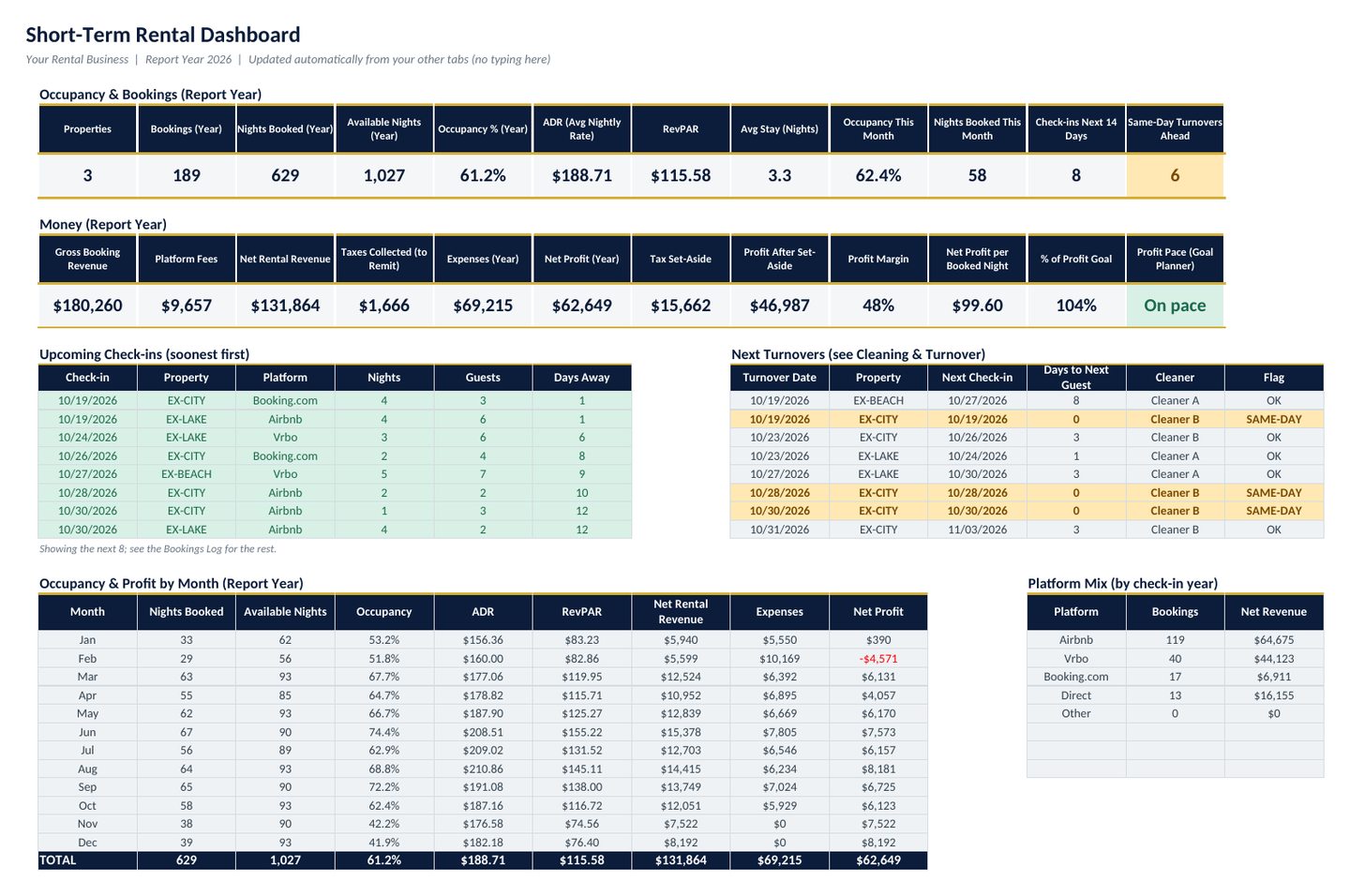
Dashboard: occupancy, ADR, RevPAR, revenue, fees, expenses and net profit, with upcoming check-ins, next turnovers and results by month.
01

Dashboard

Occupancy %, ADR, RevPAR, nights booked vs. available, gross booking revenue, platform fees, net rental revenue, taxes collected, expenses, net profit, tax set-aside, upcoming check-ins, next turnovers, results by month and by property.

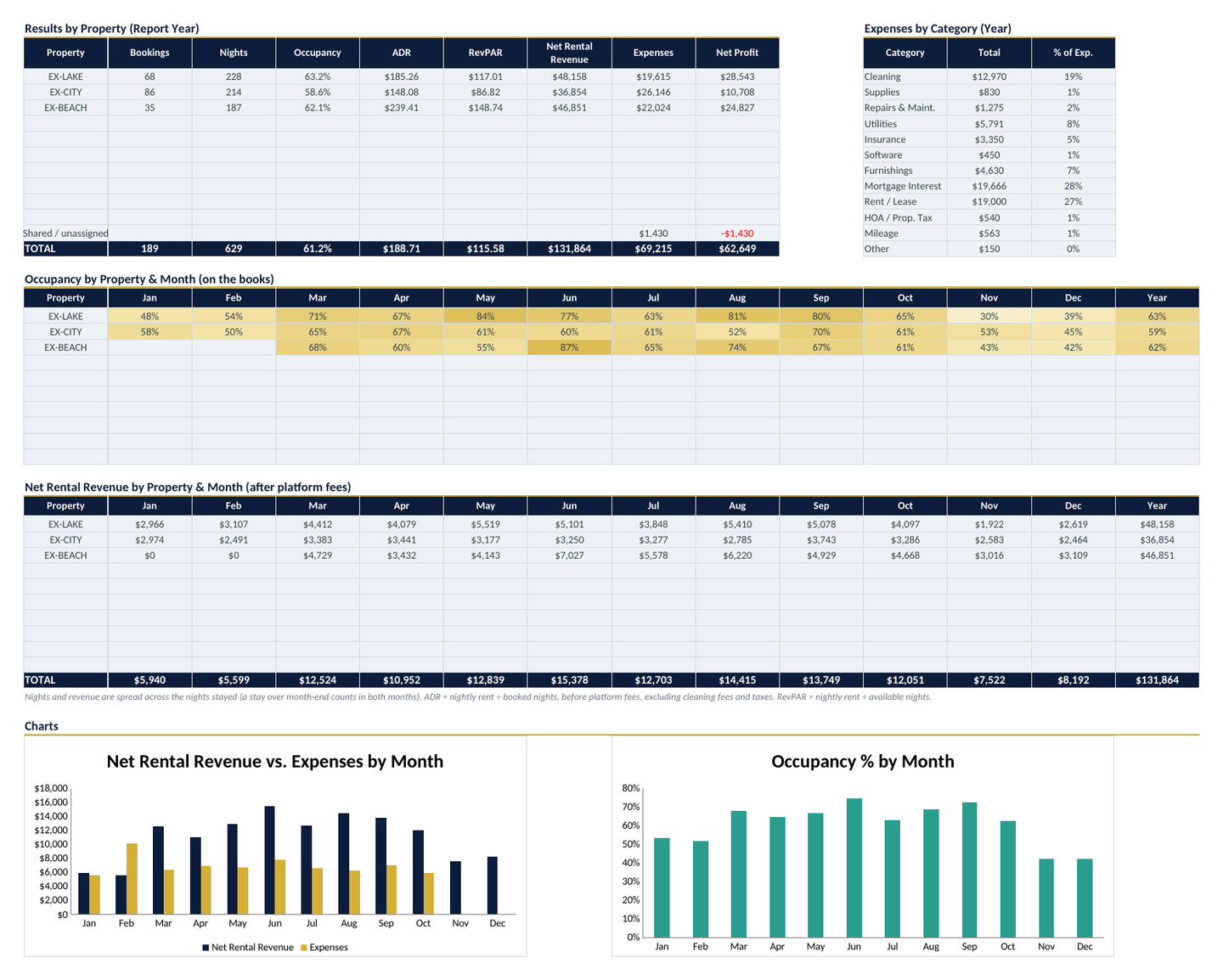
Dashboard by property: occupancy heat map, net revenue by property and month, platform mix and charts.
02

Results by property

An occupancy heat map (property × month), net revenue by property × month, platform mix and 2 charts.

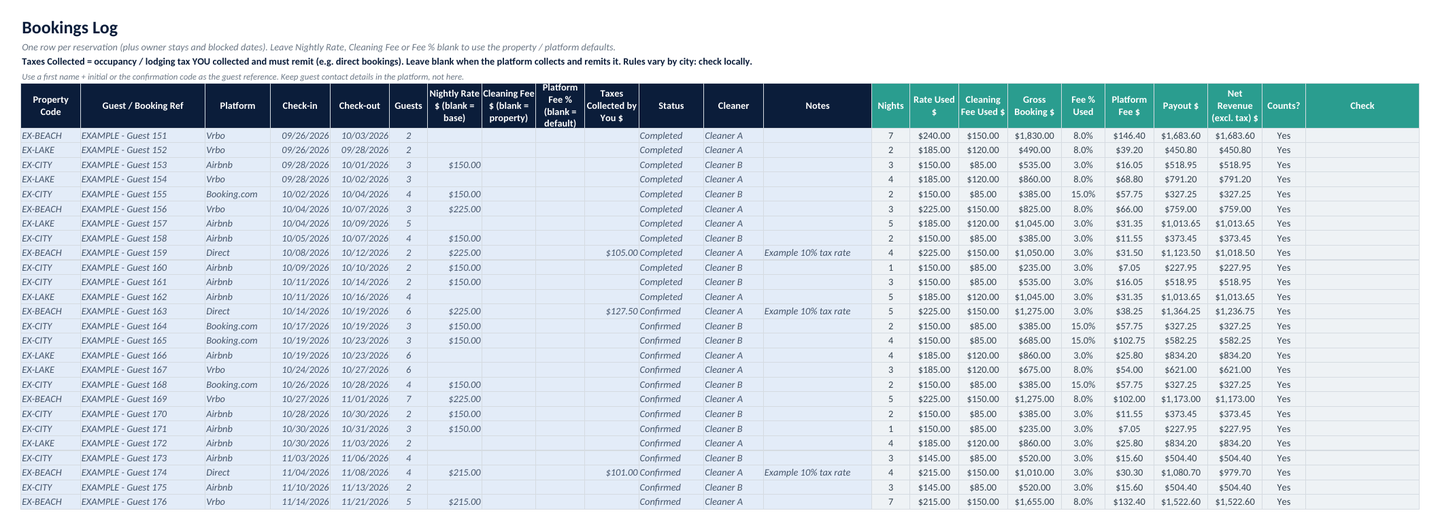
Bookings Log: property, platform, check-in and check-out, nights, guests, rate, cleaning fee, platform fee, taxes, payout, status and cleaner.
03

Bookings Log

Property, platform (Airbnb, Vrbo, Booking.com, Direct, Other), check-in / check-out, nights (calculated), guests, nightly rate, cleaning fee, platform fee %, taxes you collected, payout (calculated), status and cleaner. Blank rate / fee cells use your defaults. Overlapping stays at the same property are flagged.

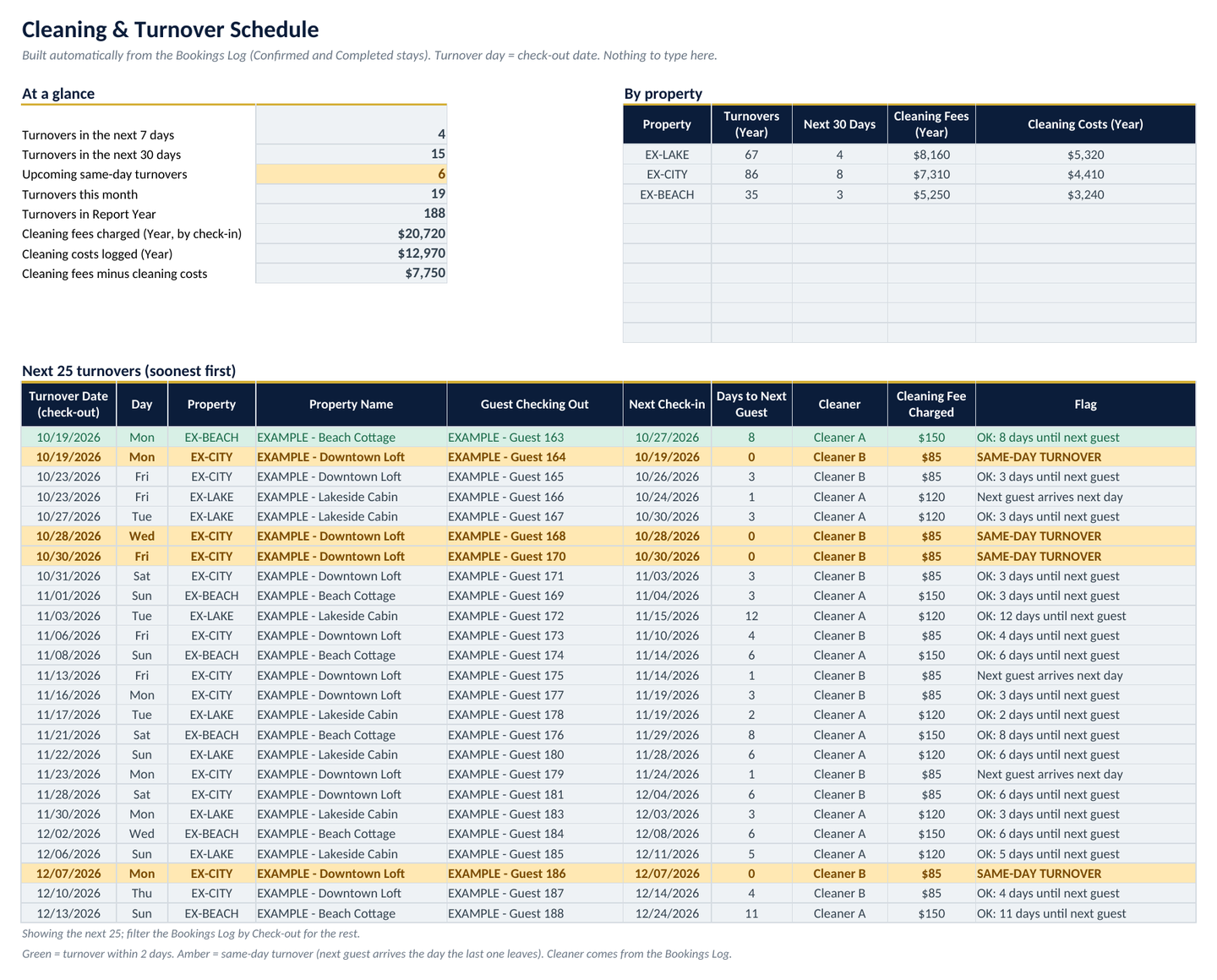
Cleaning and Turnover: next turnovers with the next check-in, days until the next guest, cleaner and same-day flags.
04

Cleaning & Turnover

Next 25 turnovers built from your bookings, with the next check-in, days until the next guest, cleaner and same-day flags. Cleaning fees charged vs. cleaning costs logged.

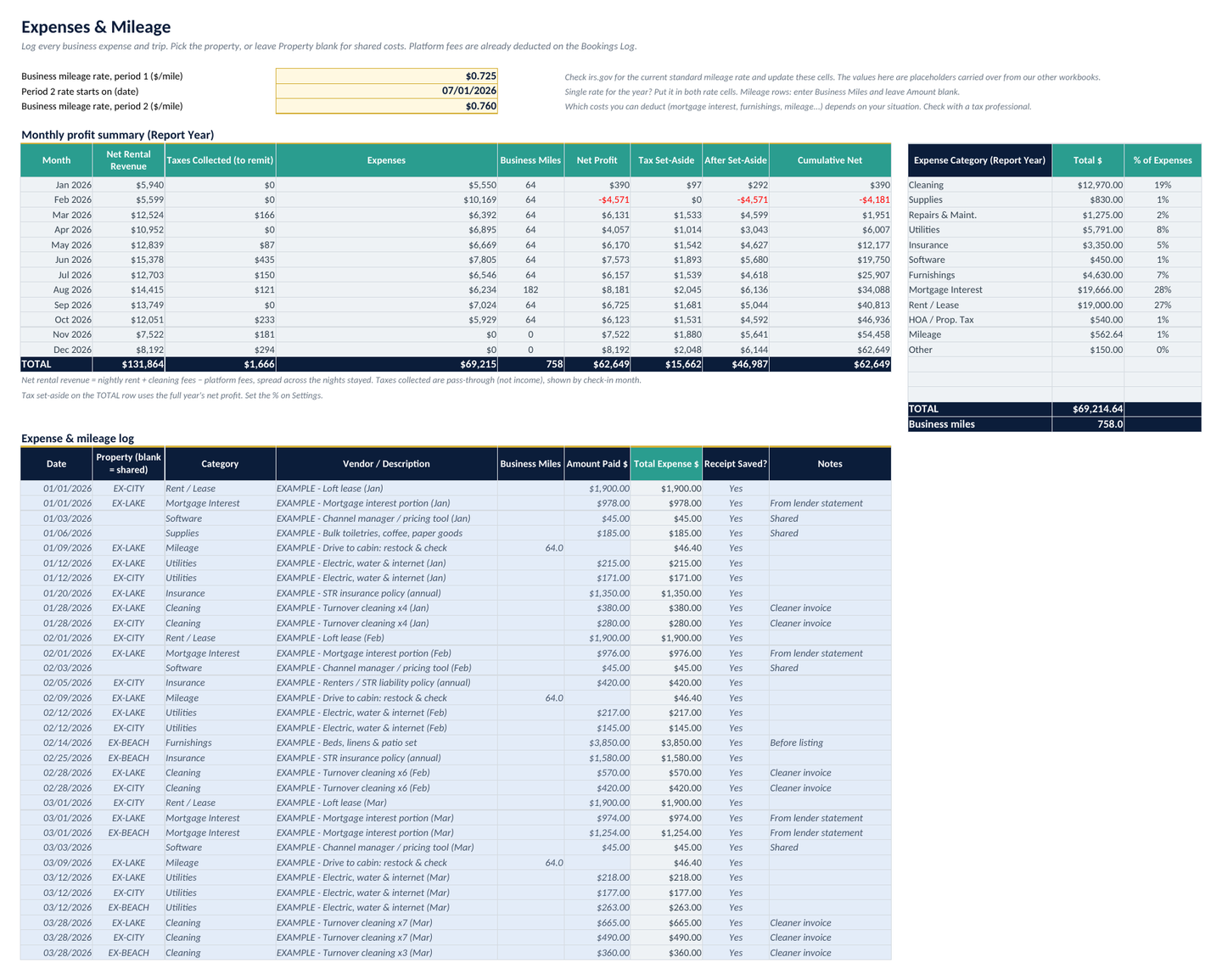
Expenses and Mileage: costs by property and category, business miles, category totals and a monthly profit summary.
05

Expenses & Mileage

Cleaning, supplies, repairs, utilities, insurance, software, furnishings, mortgage interest, rent / lease and more, by property or shared; business miles at your own rate cells (check irs.gov for the current rate); category totals and a monthly profit summary with a tax set-aside % you choose.

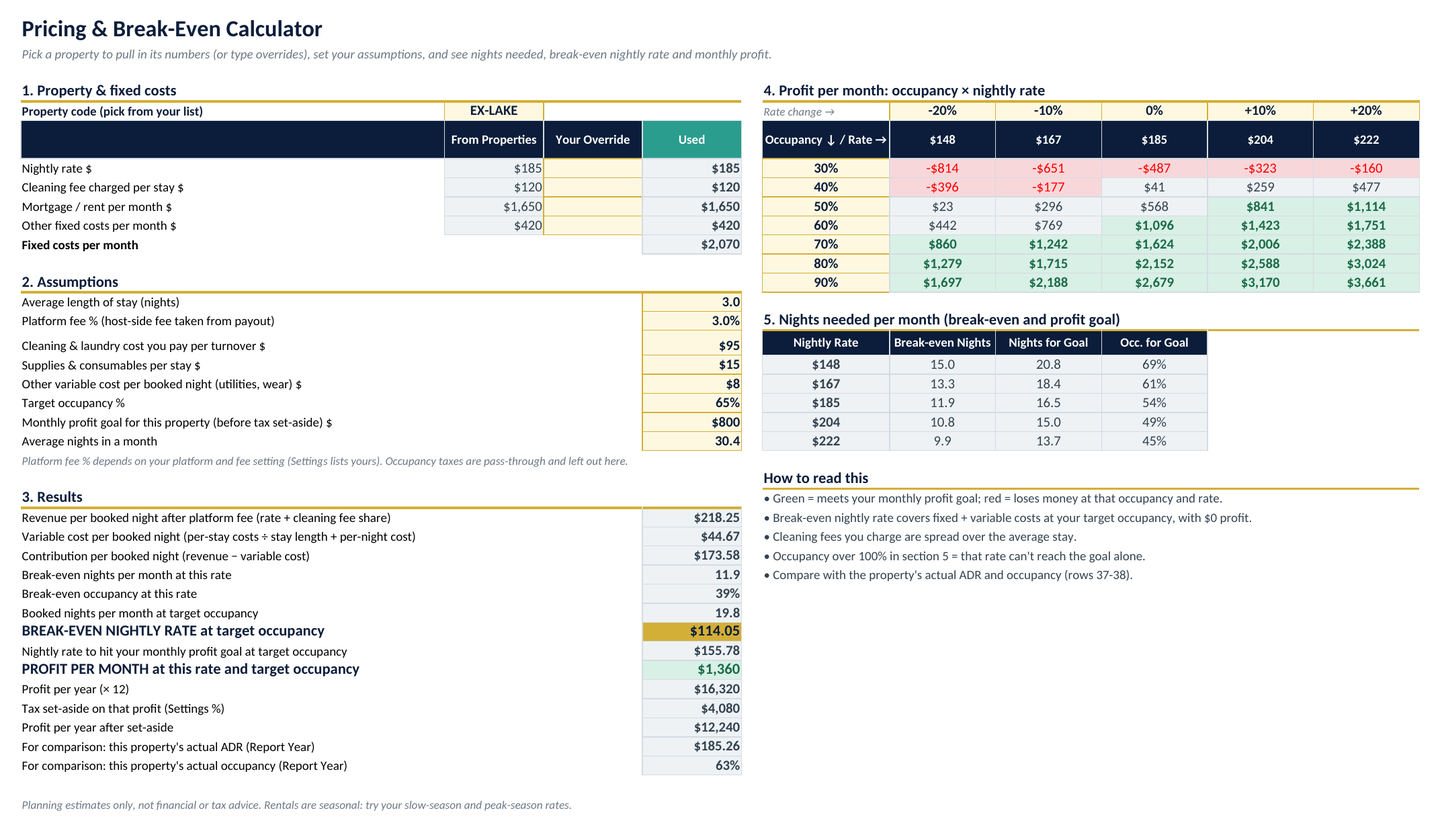
Pricing and Break-Even Calculator: break-even nights, occupancy and nightly rate, the rate for a profit goal, and an occupancy by rate profit grid.
06

Pricing & Break-Even Calculator

Break-even nights and occupancy, break-even nightly rate at your target occupancy, the rate for a monthly profit goal, and an occupancy × nightly rate profit grid.

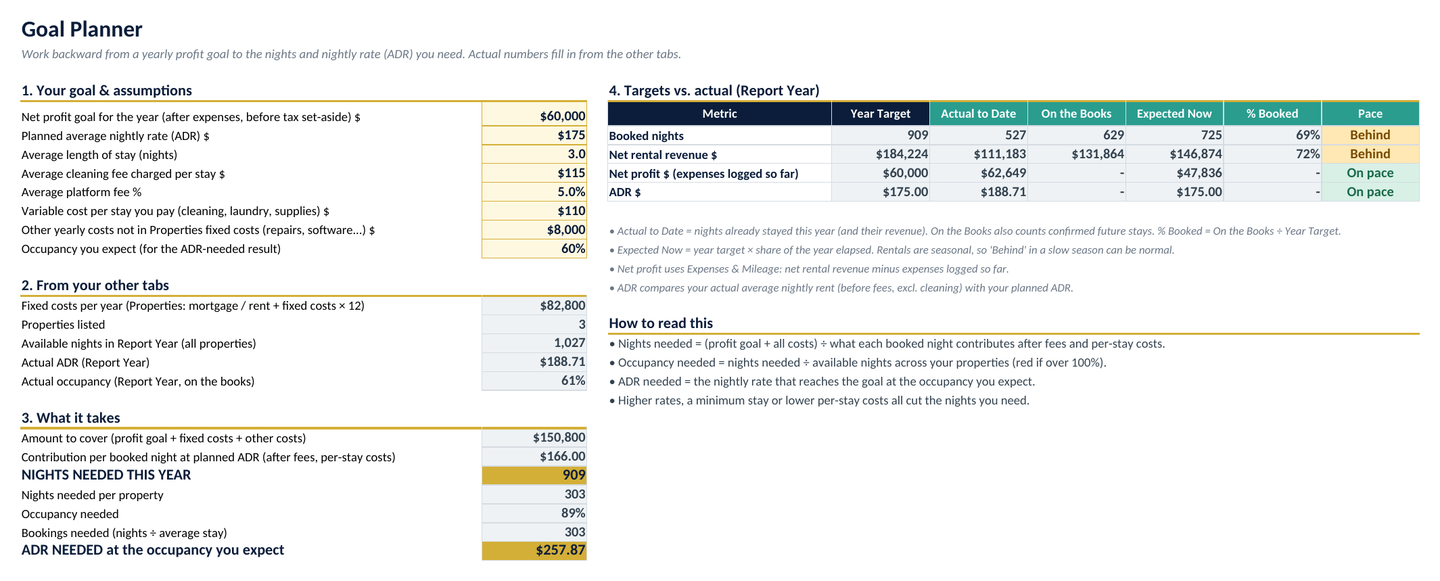
Goal Planner: profit goal turned into nights, occupancy, bookings and ADR needed, with actual-to-date and pace checks.
07

Goal Planner

Profit goal to nights, occupancy, bookings and ADR needed, with actual-to-date, on-the-books and on-pace checks.

Every tab in the workbook

  1. Start Here
  2. Dashboard
  3. Properties
  4. Bookings Log
  5. Expenses & Mileage
  6. Cleaning & Turnover
  7. Pricing & Break-Even Calculator
  8. Goal Planner
  9. Settings
  • Properties (up to 10): code, name, platforms, listed-since date, nightly base rate, cleaning fee and fixed monthly costs, with each property's bookings, occupancy, ADR, RevPAR, revenue, expenses and net profit
  • Settings: report year, your platform fee %s, default fee %, tax set-aside %, check-in window and every dropdown list
  • Room for 10 properties, 1,000 bookings and 600 expenses
  • Built for Microsoft Excel. No macros, no add-ins

Good to know

Honest notes before you buy

  • Built and tested for Microsoft Excel only. Google Sheets and Apple Numbers aren't confirmed.
  • It doesn't connect to or import from Airbnb, Vrbo or a channel manager: bookings are typed (or pasted) in.
  • Platform fee %s in the file are placeholder starting points, not current platform rates. You enter what your platforms actually charge.
  • Mileage rate cells hold placeholder values. Check irs.gov for the current rate.

Tax note

Not tax, legal or accounting advice. Occupancy / lodging taxes and short-term rental rules vary by city, county and state, and platforms collect taxes for you in some places but not others. Check your local rules and check with a tax professional.

Not affiliated with or endorsed by Airbnb, Vrbo or Booking.com.

Pricing

One price, yours to keep

FAQ

Questions, answered

What do I need to use it?

Microsoft Excel. It's built for Excel, with no macros and no add-ins.

Does it work in Google Sheets or Apple Numbers?

It's built and tested for Microsoft Excel only. Google Sheets and Apple Numbers aren't confirmed, so we don't claim them.

Does it connect to Airbnb, Vrbo or my channel manager?

No. It doesn't connect to or import from Airbnb, Vrbo or a channel manager: bookings are typed (or pasted) in.

Are the platform fees and mileage rates current?

No. Platform fee %s in the file are placeholder starting points, not current platform rates. Enter what your platforms actually charge. Mileage rate cells hold placeholder values. Check irs.gov for the current rate.

How many properties and bookings does it hold?

Room for 10 properties, 1,000 bookings and 600 expenses. Clearly labeled EXAMPLE rows (3 sample properties, about 200 bookings) show how it works; delete them or type over them.

Is this a subscription?

No. It's a one-time purchase of $34. Pay once, no subscription.

Is this tax advice?

Not tax, legal or accounting advice. Occupancy / lodging taxes and short-term rental rules vary by city, county and state, and platforms collect taxes for you in some places but not others. Check your local rules and check with a tax professional.

What's your refund policy?

These are instant digital downloads, so all sales are final. If a file won't open or doesn't work as described, email [email protected] within 14 days and we'll fix it or give you a full refund.

Know whether your rentals are making money

Bookings, occupancy, turnovers, expenses and profit for up to 10 listings. $34, pay once.